RadiusOneAvailable

The ISP back office on FreeRADIUS.

Subscribers, service plans, billing and NAS monitoring in one portal. One command installs it on your own Ubuntu server.
Demo data
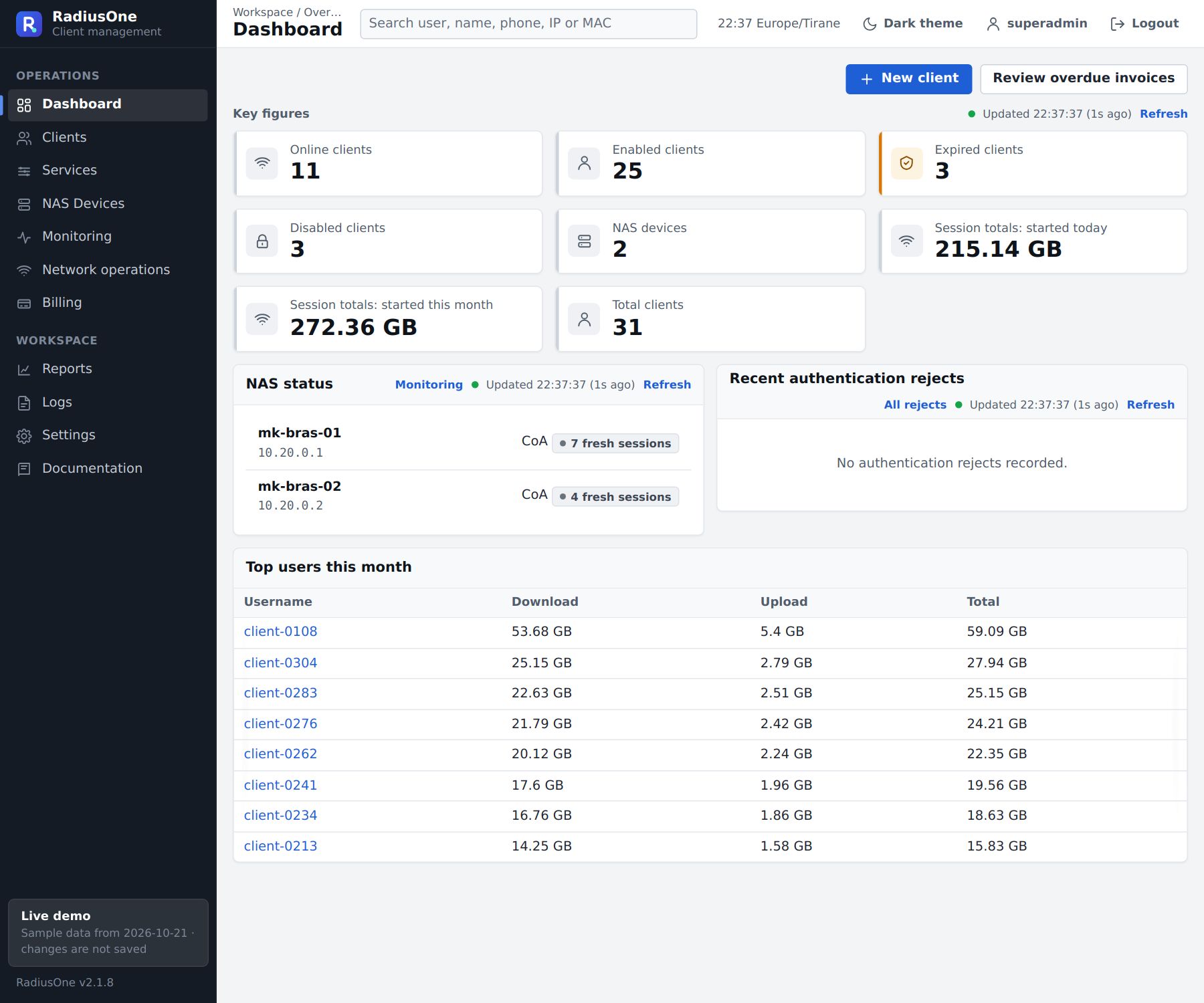
The RadiusOne dashboard: online clients, NAS status and top users

Everything the ISP office does.

From the first PPPoE login to the monthly invoice, in one portal your whole team shares.

Subscribers

  • PPPoE customers and service plans
  • Static IPs and IP pools
  • Suspension and expiry
  • Daily usage and data caps per plan

Billing

  • Recurring invoices generated every night
  • Payments with PDF receipts
  • Overdue invoices in one list

Network

  • SNMP v1, v2c and v3 monitoring
  • Disconnects over RADIUS CoA or the RouterOS API
  • Live sessions and authentication logs

Notifications

  • Customer email (SMTP or Mailgun) and SMS
  • Admin alerts and reports by email or Telegram

Safety

  • Seven operator roles
  • Two-factor sign-in for privileged roles
  • Nightly encrypted backups to Backblaze B2, Cloudflare R2 or SFTP

Upkeep

  • Software updates and rollback from inside the portal
  • Your company name and logo on the portal, emails and PDFs

Where it sits in your network.

RadiusOne writes to the same SQL tables FreeRADIUS already reads. It never sits in the login path, so subscribers keep connecting even while the portal is down for maintenance.

  1. Customer routerPPPoE login
  2. NASMikroTik RouterOSCisco IOS XE in Beta
  3. RADIUSFreeRADIUS
  4. DatabaseStandard FreeRADIUS SQL tables
Beside the login pathRadiusOneReads and writes the SQL tables. Talks to the NAS for CoA disconnects and SNMP monitoring.

Where RadiusOne fits.

Four everyday situations in an ISP, and what RadiusOne does in each.

A wireless ISP with towers and MikroTik routers

Customers connect over PPPoE through RouterOS NAS devices spread across several sites.

  • Each NAS is added once, with its RADIUS secret and SNMP settings
  • Suspend or expire a customer, and RadiusOne ends the session over RADIUS CoA
  • The monitoring page shows which NAS devices are up and how many sessions each carries

One command on a fresh server.

The installer sets up the portal, the database and FreeRADIUS, already connected and secured, with a Let’s Encrypt certificate for your domain.

sudo bash install.sh --domain radius.example.com

Later updates and rollbacks run from inside the portal.

Operating system
Ubuntu 24.04 LTS, server or minimal
Server
2 CPU cores, 4 GB RAM and 20 GB disk to start; more database memory for thousands of clients
Access
Root, or a user with sudo rights
Internet
Required during installation
Domain
Optional: a DNS name for a trusted Let’s Encrypt certificate
Routers
MikroTik RouterOS, tested end to end; Cisco IOS XE in Beta
$ sudo bash install.sh --domain radius.example.com==> Checking the server==> Installing packages (nginx, PHP 8.3, MariaDB, FreeRADIUS)==> Generating keys and passwords==> Creating the database==> Setting up the application==> Creating the application tables==> Connecting FreeRADIUS to the database==> Configuring HTTPS and the web server==> Scheduling jobs and backups==> Creating the first administrator==> RadiusOne is installed.    Portal: https://radius.example.com

See it on sample data.

The demo runs the real RadiusOne portal on sample data. Click through anything; nothing you change is saved.